
Top Stories
New OmniTools Image Editor Launches, Revolutionizing Online Editing

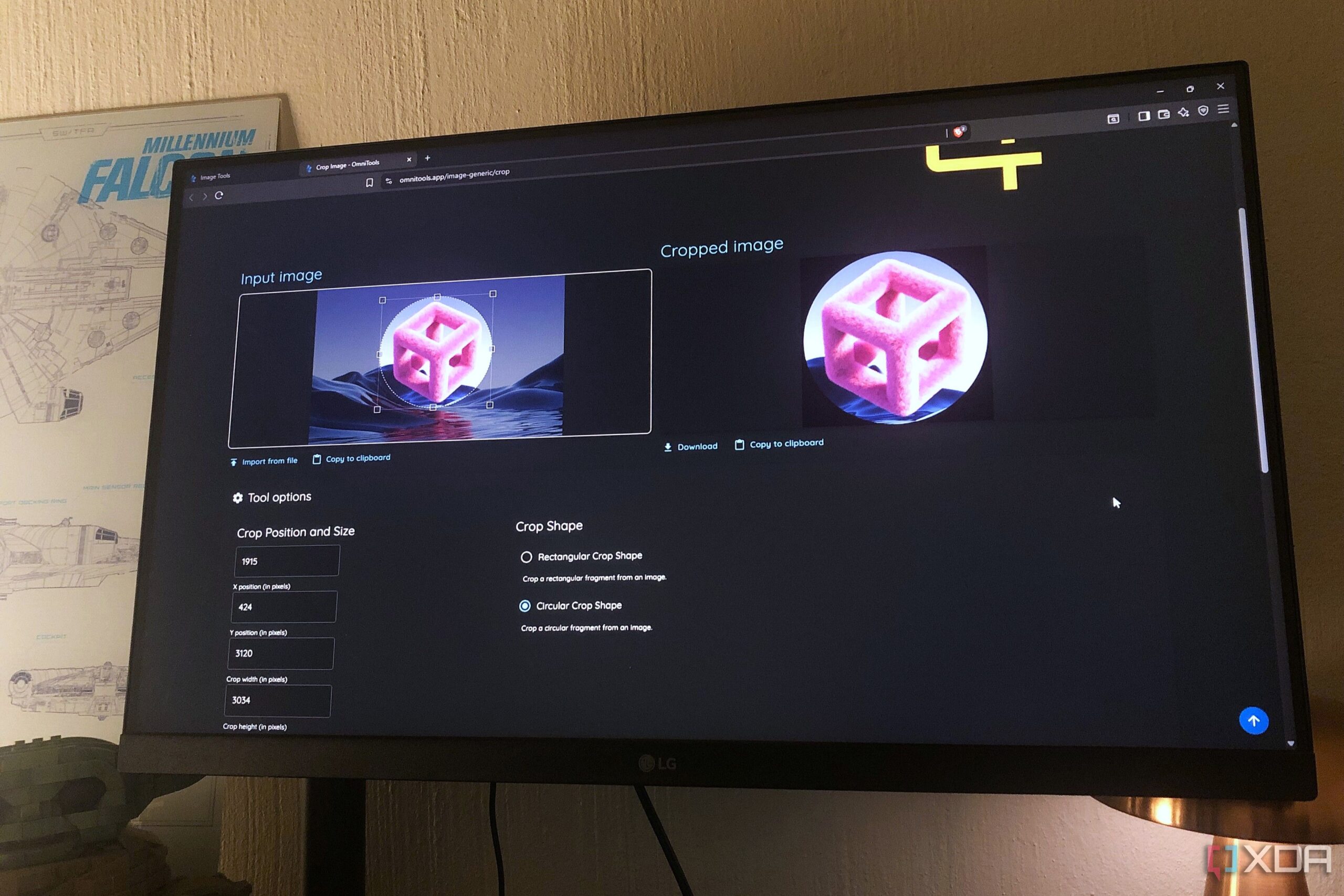
BREAKING: The new OmniTools Image Tools suite has just launched, transforming the way users approach image editing online. This browser-based, open-source tool offers a comprehensive set of features, allowing users to edit images without the hassle of installing heavy software.
With its innovative capabilities, OmniTools caters to both casual users and professionals who require quick and efficient image editing solutions. The suite includes essential tools such as background removal, resizing, and image conversion, all accessible directly through your browser.
IMPACT: This launch is significant for anyone who frequently edits images, as it eliminates the need for multiple applications. Users can now perform a variety of tasks—ranging from basic cropping to advanced color editing—all within one platform.
One standout feature is the background removal tool, which has been reported to perform exceptionally well, even with difficult subjects like hair strands. Users have noted a near-perfect removal experience, a feat not commonly found in free editing software.
Additionally, the transparent PNG color removal feature allows for precise isolation of subjects from backgrounds, akin to chroma keying technology. This is especially useful for content creators needing to edit images quickly.
RESIZE AND CROP: OmniTools excels in basic tasks such as resizing and cropping. Users can easily adjust dimensions by pixels or percentages, while the cropping tool offers advanced options, including circular crops for social media profile pictures.
Furthermore, the image compression feature allows users to shrink file sizes significantly without sacrificing quality, making it ideal for web usage and email sharing. For instance, a 10MB image can be compressed down to just 500KB.
Converting images to JPEG format is another daily necessity for many users. OmniTools simplifies this process, supporting various formats such as WebP, PNG, and TIFF, while enabling users to control the output quality.
Perhaps surprisingly, the suite also includes an image-to-text OCR feature that extracts text from images with impressive accuracy. This tool is invaluable for digitizing notes or capturing quotes from visual media, adding another layer of utility for users.
The OmniTools image editor itself is streamlined yet powerful, featuring HSL sliders for hue and brightness adjustments, as well as a diverse selection of filters. The addition of an annotation tool enhances the platform, allowing users to draw and add shapes directly to their images.
WHAT’S NEXT: As the demand for online editing tools continues to grow, OmniTools is positioned to lead the charge with its comprehensive suite. Users are encouraged to explore these features and share their experiences, as this tool could redefine convenience in image editing.
In just a matter of hours, OmniTools has already garnered attention from users around the globe, who are eager to leverage its capabilities. For anyone looking to simplify their image editing tasks, OmniTools is a game-changer worth trying today.
Stay tuned as we monitor user feedback and additional updates on this innovative platform.

Wyomissing Police Report Busy November with Hundreds of Calls

Versant Capital Management Boosts Citigroup Stake by 58.2%

David Harbour Discusses Intense Psychotherapy Journey for Mental Health

US Health Officials Restore $1.9 Billion for Mental Health Programs

Friends Association Opens New Shelter to Aid Families in Need

Greenland and Denmark Conclude Talks with US on Territory Dispute

Chelsea Handler Slams Timothee Chalamet’s Praise for Kylie Jenner

Over 387,000 Users Download Vulnerable Apache Struts Versions

Hawks Seek Redemption Against Trail Blazers After Lakers Loss

University of Hawaiʻi Joins $25.6M AI Initiative to Monitor Disasters

Interstellar Object 3I/ATLAS Emits Unprecedented Metal Alloy

Toledo City League Announces Hall of Fame Inductees for 2024

DOJ Seizes $15 Billion in Bitcoin from Major Crypto Fraud Network

Western Executives Confront Harsh Realities of China’s Manufacturing Edge

Sharp Launches Five New Aquos QLED 4K Ultra HD Smart TVs

Mutual Advisors LLC Increases Stake in SPDR Portfolio ETF

Celtics Coach Joe Mazzulla Dominates Local Media in Scrimmage

Community Unites for 7th Annual Walk to Raise Mental Health Awareness
-
Science2 months ago
University of Hawaiʻi Joins $25.6M AI Initiative to Monitor Disasters
-
 Science3 months ago
Interstellar Object 3I/ATLAS Emits Unprecedented Metal Alloy
-
 Lifestyle3 months ago
Toledo City League Announces Hall of Fame Inductees for 2024
-
 Business3 months ago
DOJ Seizes $15 Billion in Bitcoin from Major Crypto Fraud Network
-
 Science3 months ago
Western Executives Confront Harsh Realities of China’s Manufacturing Edge
-
 Top Stories3 months ago
Sharp Launches Five New Aquos QLED 4K Ultra HD Smart TVs
-
 Politics3 months ago
Mutual Advisors LLC Increases Stake in SPDR Portfolio ETF
-
 Sports3 months ago
Celtics Coach Joe Mazzulla Dominates Local Media in Scrimmage
-
 Health3 months ago
Community Unites for 7th Annual Walk to Raise Mental Health Awareness
-

 Politics3 months ago
Major Networks Reject Pentagon’s New Reporting Guidelines
-

 World3 months ago
INK Entertainment Launches Exclusive Sofia Pop-Up at Virgin Hotels
-

 Top Stories3 months ago
Microsoft Releases Urgent Windows 11 25H2 Update for All Users